The Workflow
How work flows from idea to shipped code across two worlds.
Asana World
Where Product Owner, Designer, and QA live. Tracks status, assignments, and notifications. This is the shared space everyone sees.
-
Product Owner creates structured tickets with Claude -
Designer enriches tickets with UI/UX specs and mockups -
QA tests against the acceptance criteria in the ticket
Repo World
Where the Developer lives. Blueprints, code, and PRs. The technical recipe lives here, right next to the source code.
The Bridge
The Asana ticket template is the bridge. It's a structured contract — the PO's Claude fills it, the Developer's Claude consumes it. When a ticket reaches Ready for Development, the developer runs /scaffold and the bridge is crossed.
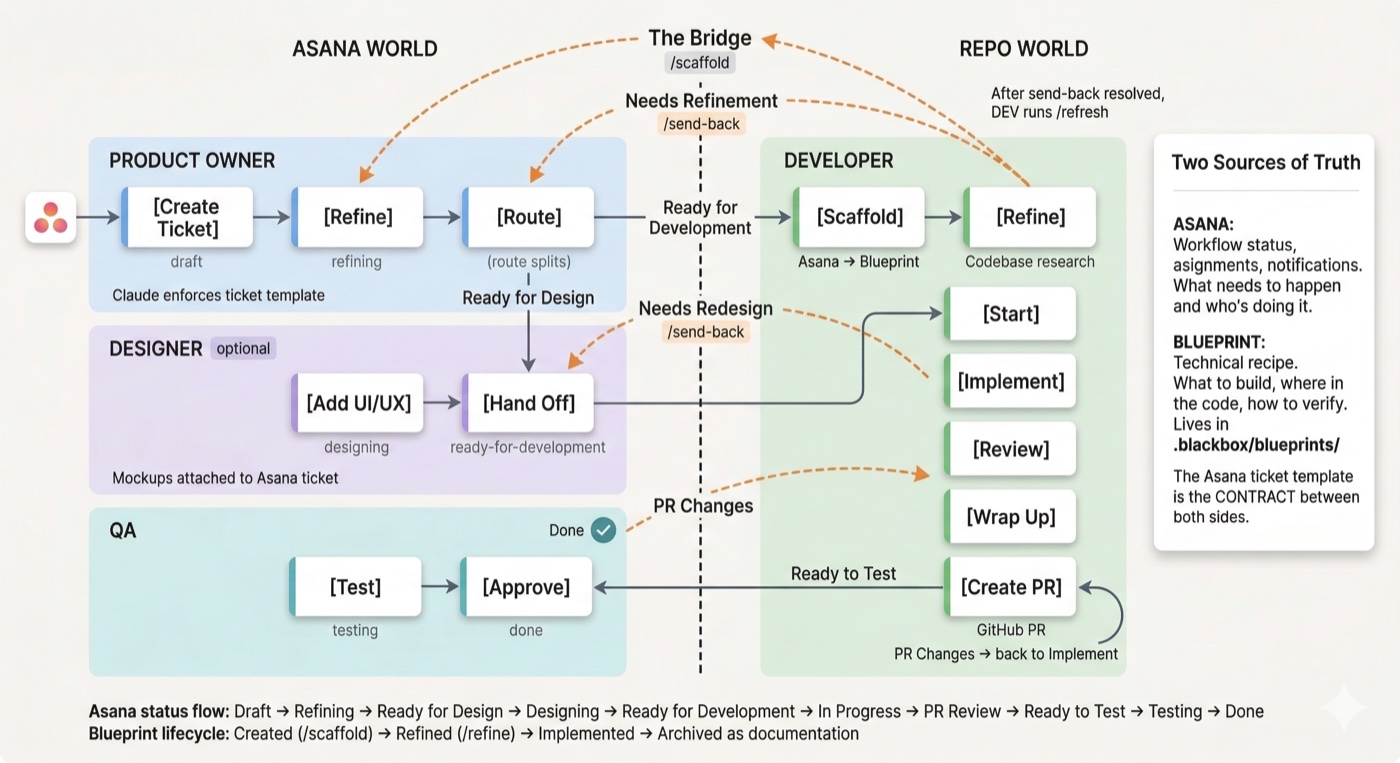
End-to-end workflow: from Asana ticket to shipped code
Ticket Lifecycle
Every ticket in Asana moves through a sequence of statuses. Each status represents a clear handoff — when a ticket changes status, a different role picks it up. No one has to ask "is this ready?" or "whose turn is it?" The status tells you.
All Statuses
Colors indicate ownership: gray = Product Owner, purple = Design, blue = Developer, green = QA.
Not Every Ticket Takes the Same Path
The statuses above are all the possible steps. In practice, tickets skip steps depending on what's needed. A backend API fix doesn't need design. A production hotfix can't wait for refinement. Here are the three paths a ticket can take:
Features with UI changes. Goes through all roles.
Draft → Refining → Ready for Design → Designing → Ready for Dev → In Progress → PR Review → Ready to Test → Testing → Done
Backend work, bug fixes, or anything without UI. Skips design.
Draft → Refining → Ready for Dev → In Progress → PR Review → Ready to Test → Testing → Done
Production is broken. Skip refinement and design — go straight to code.
Draft → In Progress → PR Review → Ready to Test → Done
Send-backs
Work can flow backward when requirements are wrong or issues are discovered.
Requirements wrong or incomplete
UI spec doesn't work
Requirements unclear for UI mapping
Issues found during testing
After a send-back is resolved, the developer runs /refresh to pull the updated Asana content into the existing blueprint. Asana-owned sections are overwritten, developer-owned sections are preserved.
Developer Sequence
The full command flow from Asana ticket to GitHub Pull Request.
Generate personalized CLAUDE.md files for PO and DESIGN roles. Run once after project setup.
Generate a blueprint from an Asana ticket.
Spawns parallel agents to research the codebase, then drives a guided Q&A to fill technical context and implementation plan.
Review the blueprint summary and begin work.
Execute the implementation plan step by step with task tracking.
Self-review changed files against a quality checklist.
Clean code, run lint, and create a PR document.
Create a GitHub pull request from the PR document.
Everyone Moves Forward
The workflow isn't about adding process — it's about removing confusion. Each role knows exactly when their work starts, what they need to deliver, and when they're done. Send-backs catch problems early. Skills automate the handoffs. Nothing falls through the cracks.
Product Owner
defines
the what and why
Designer
shapes
the how it looks
Developer
builds
with full context